
TradeStation Strategy Builder: GSB with TradeStation
Genetic System Builder (GSB) is a TradeStation strategy builder and EasyLanguage strategy generator: it searches your data for systems and writes each one as EasyLanguage. You paste the code into a TradeStation strategy, check it matches GSB, then simulate before going live.
By GSB Pro · Updated
On this page
What a strategy generator does for TradeStation users
TradeStation lets you write, backtest and automate strategies in EasyLanguage. What it doesn't do is come up with the rules for you. A strategy generator fills that gap: you supply the market, data and settings, and the software searches for entry and exit rules.
GSB does this with a genetic algorithm. It builds and tests large numbers of candidate systems from its built-in indicators, such as RSI, DMI, ROC and CCI. It then keeps the systems that hold up on data they weren't built on.
TradeStation is GSB's lead platform. Trademaid's developer, Peter Zwag, trades on it himself, and new GSB features reach TradeStation and MultiCharts before NinjaTrader. If you already know TradeStation, that's the platform he suggests.
How GSB builds a system and exports EasyLanguage
The path from data to a TradeStation chart has five stages. Each one is covered click by click in the Strategy Guide's Export to TradeStation page.
- Build and select. Run a build in GSB, then choose a system and walk it forward. See Building Strategies, Selecting Systems and Walk-Forward Optimization.
- Load GSB's functions once. In GSB click File → Supplementary Scripts (TS & MC) and import the newest .ELD file into TradeStation. Load the new file after every GSB update. See Loading GSB Functions.
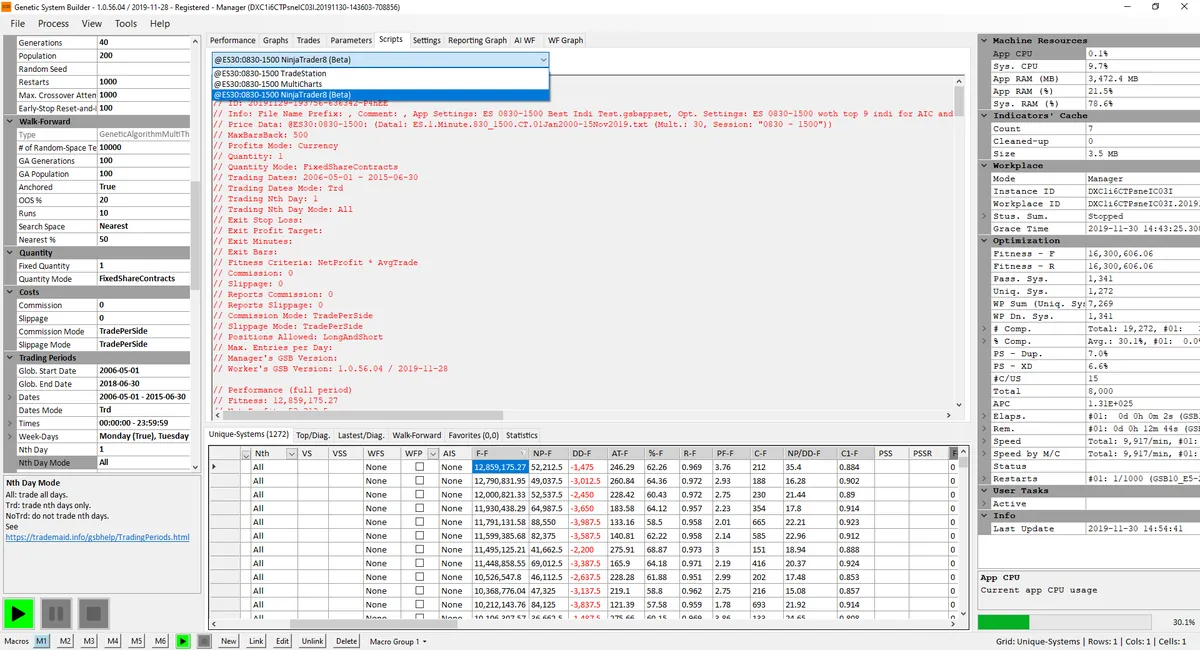
- Copy the script. Select the system, open the Scripts tab and choose its TradeStation entry from the drop-down. After a walk-forward, choose the entry ending in / WF. Right-click and copy it.
- Paste and verify. In the TradeStation Development Environment, create a new Strategy, paste the code and click Verify. It must verify with no errors.
- Match the chart. Use the script header's Price Data line to set the symbol, bar interval, any Data2 series, session template, time zone and dates. Set Maximum number of bars study will reference to 500, and use the same commission and slippage as GSB.
Hypothetical Performance Disclosure
Newer builds offer two copy options. Copy for match check is for reconciling with GSB. Copy for live trading is the code you trade, and its trades won't exactly equal GSB's report.
Always paste into a new strategy
TradeStation keeps old input values if you paste over a strategy already on a chart. GSB writes its settings as vars rather than inputs to avoid this. Change them to inputs only if you want to optimise in TradeStation.
More on what the exported code contains is on the platform export page.
Data setup: build on TradeStation data
Build on data exported from the platform you'll trade. Prices differ slightly between sources, even for the same market and bar size, so TradeStation data gives the closest match.
- Export from TradeStation's Data Window into GSB's Price Data folder, as a .txt file.
- Name the file GSB's way: symbol.time frame.bar type.anything you like.txt, for example ES.30.Minute.830.1500.CentralUSATime.txt.
- Set the chart's volume to Tick Count (up plus down volume) before exporting, and use the same setting on the trading chart.
- Remove chart indicators first, as they add columns that break the file.
- Keep every data stream on the same time zone. The trading chart must match the time stamps in the data you built on.
The full steps, including loading the file into GSB's Price Data window, are on Uploading Data to GSB. For adding a new market, see Datasets and Symbols.
Check TradeStation matches GSB before you trade
Open TradeStation's Strategy Performance Report. Over exactly the same dates, compare net profit, drawdown and number of trades with GSB's Performance tab.
Using the match-check code, Peter expects about 98–99% or more of trades to match. Newer GSB builds also have a Match-Check button in Tester Settings that lists the worst mismatches first.
Big differences usually mean a set-up mismatch: bars back not 500, a different session or time zone, a different volume setting, or old GSB functions. Hundreds of missing trades almost always point to the session or time zone.
Live-trading considerations on TradeStation
Simulate for at least two weeks before going live, then start small. The Strategy Guide's Live Trading Operations page covers what Peter has learned running GSB systems on TradeStation.
- End-of-day exits. SetExitOnClose can fail live on TradeStation 10 unless the session uses the market's standard close. Use an explicit exit based on SessionEndTime instead.
- Custom sessions. A workspace remembers a session template's name but not the template. Create it on a new PC before opening the workspace.
- Rollovers. TradeStation rejects orders on continuous symbols, so every data stream must use the same specific contract near the roll.
- Stability. Restart TradeStation regularly, keep chart history to about a year, and keep each instance to about 48 charts.
- Shadow trades. After a reload, a chart can show a trade that never happened. Refresh a GSB strategy by toggling its Status off and on, not with Reload.
- One system per chart, and don't add broker-side stops tighter than the system's own exits.
Honest limits
- GSB runs on Windows only, so you need a Windows PC to build systems.
- GSB searches its own built-in indicators. It isn't a tool for testing your own indicator ideas.
- The learning curve is real. The free 53-lesson course walks through every step, including the TradeStation export.
- The free 14-day trial has a smaller indicator set than the full version.
- A backtest that matches GSB is still hypothetical. Systems can and do fail out of sample, and real slippage may be higher than you assumed.
Before buying, compare GSB with other generators on our comparison page. GSB Pro is an authorised reseller, so it has an interest in the sale.
Frequently asked questions
Does TradeStation have a strategy builder?
TradeStation gives you EasyLanguage to write, backtest and automate your own strategies. A strategy generator such as GSB searches for the rules and then writes the EasyLanguage code for you to paste in.
Does GSB export to TradeStation?
Yes. Each system has a TradeStation version on GSB's Scripts tab, plus a / WF version after a walk-forward. You copy it, paste it into a new TradeStation strategy and verify it.
Why does GSB's code need the GSB functions in TradeStation?
GSB systems call special GSB functions. Import the newest .ELD file from File, Supplementary Scripts (TS & MC) before the strategy will verify, and again after every GSB update.
Why don't my TradeStation results match GSB?
Check bars back is 500, and that the session, time zone, bar interval, volume setting, commission and slippage match your GSB build. Also check you loaded the latest GSB functions and pasted the right script.
Can I build a TradeStation strategy without coding?
Yes. GSB writes the EasyLanguage itself, so you only paste and verify it. Knowing a little EasyLanguage still helps with changes such as an explicit end-of-day exit.
Are automatically generated strategies just curve-fit?
They can be, which is why GSB uses out-of-sample dates, walk-forward testing and verification data. You still reconcile, simulate and start small before trusting a system.
Try it on your own market
Start a free 14-day GSB trial and learn the method with our free 53-lesson video course. GSB Pro is an authorised Trademaid reseller and earns a commission if you buy.