Authorised GSB reseller · powered by Trademaid

    Let the computer discover your best trading systems

    Genetic System Builder (GSB) builds and stress-tests thousands of candidate systems for your market, then exports the code for TradeStation, MultiCharts or NinjaTrader. Try it free for 14 days: create a free GSB Pro account (1 minute), then register on Trademaid's forum to get your trial download.

    Supported Platforms

    TradeStation
    MultiCharts
    NinjaTrader

    Automated system discovery, not manual strategy building

    GSB finds the indicators that suit your market and builds complete systems automatically. No guessing which indicators to use—let the data decide.
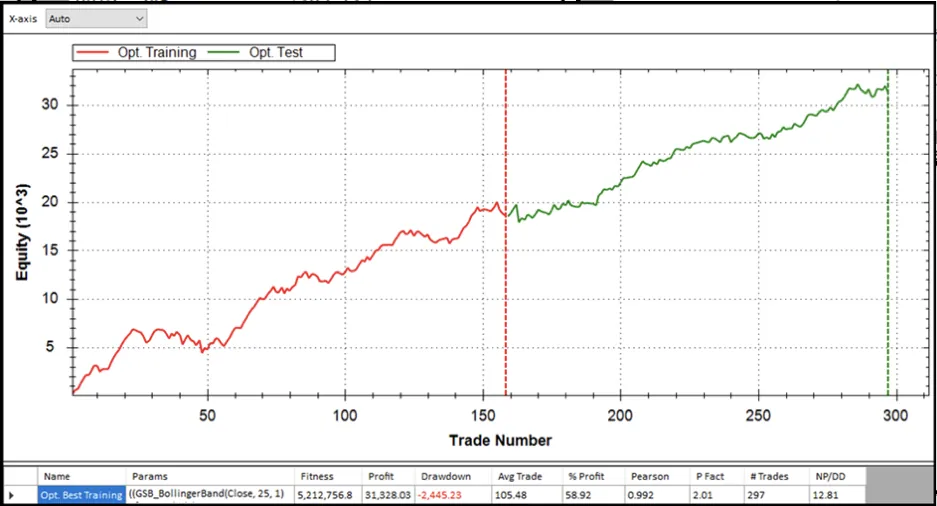
    Genetic Algorithm Discovery
    Genetic Algorithm Discovery
    GSB uses genetic algorithms to search combinations of its built-in indicators, entry types and parameters, building and back-testing thousands of candidate systems for your market.
    Walk-Forward Optimization
    Walk-Forward Optimization
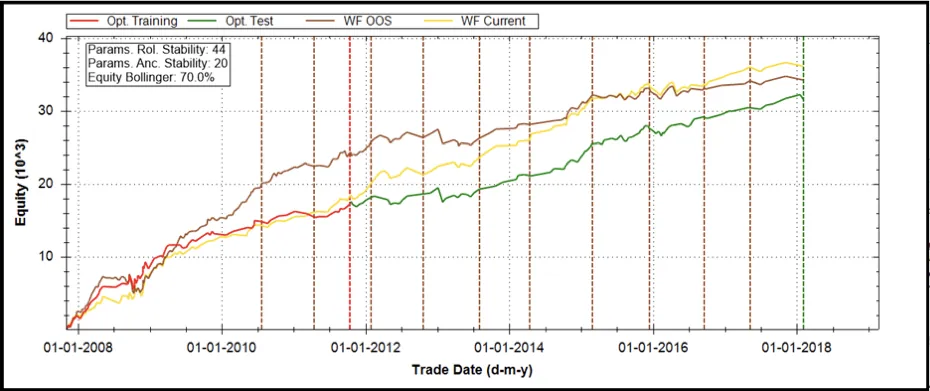
    Walk-forward test candidate systems inside GSB. The equity graph marks each walk-forward in-sample/out-of-sample boundary, so you can see how a system held up on data it was not optimised on.
    Comprehensive Validation
    Comprehensive Validation
    Check systems on out-of-sample dates and on verification data (other markets, or price data with random noise added), with performance filters that reject systems that don't hold up.
    Multi-Platform Export
    Multi-Platform Export
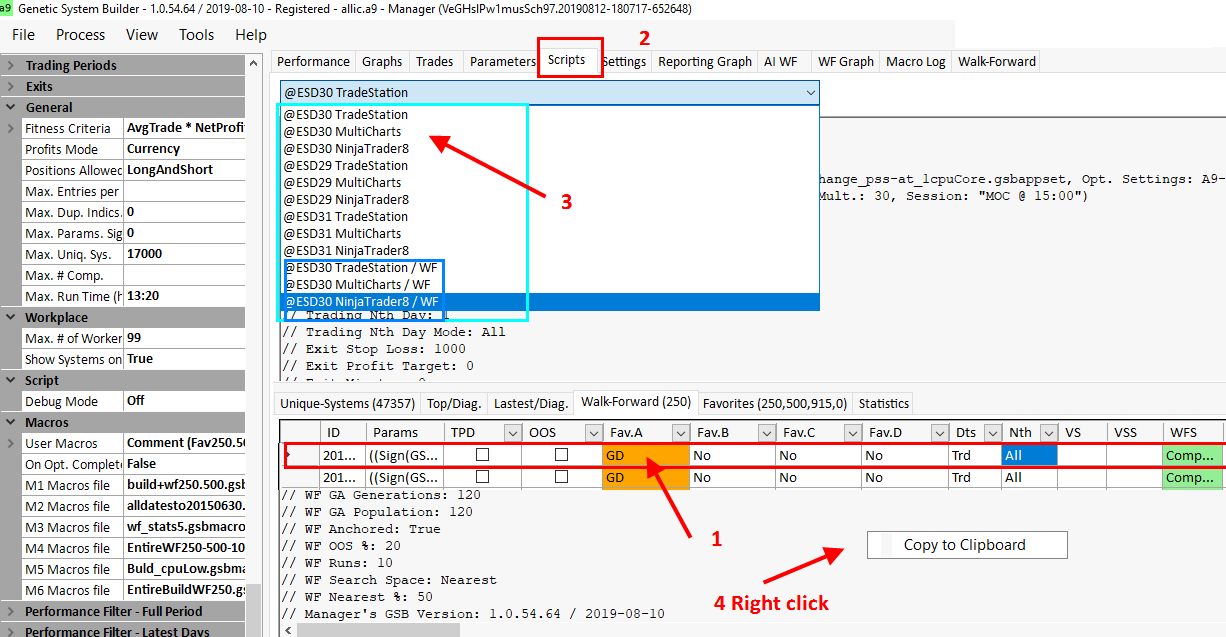
    Copy a selected system's code from the Scripts tab into TradeStation, MultiCharts or NinjaTrader 8, then check the platform results match GSB.
    Fully Automated Building
    Once GSB is set up for your data, it builds and ranks systems unattended. Macros (and the optional GSB Automation add-on) can automate repeated tests.
    Multi-Market Validation
    Add verification price data for related markets or timeframes and see how each system performs on them.
    Smart Constraints
    Set guardrails to guide the search toward realistic systems, but let the computer do the discovery.
    Complete System Analysis
    Performance statistics, equity graphs, trade lists and parameter stability scores for each generated system.

    Fully automated system discovery

    GSB finds the indicators that suit your market, checks them out of sample, then builds complete trading systems you can walk-forward test, verify on other data and export.

    01

    Discover Best Indicators

    GSB builds systems from its library of built-in indicators, then its Statistics tab shows which indicators appear most in the best systems for your market—not what you think should work.

    02

    Validate Out of Sample

    Check the indicator statistics on out-of-sample dates, and keep only the indicators that hold up for the next build.

    03

    Build Complete Systems

    GSB builds complete trading systems from the chosen indicators, with their parameters optimised during the build.

    04

    Test Robustness

    Walk-forward testing, parameter stability scores and verification on other markets help you spot systems that are curve-fit.

    05

    Export Code

    Copy the system's code for TradeStation, MultiCharts or NinjaTrader 8 from GSB's Scripts tab.

    06

    Verify and Paper Trade

    Check the platform results match GSB, then paper trade before you consider trading live.

    Want to see this on real markets? Our case studies follow Trademaid's GSB builds for crude oil, the S&P 500, Nasdaq and index futures step by step, with screenshots. Results shown are hypothetical.

    Example Output

    What GSB produces

    Example equity curves from Trademaid's GSB help pages. Where marked, the out-of-sample section is data the system was not built on.

    S&P 500 E-mini long-only swing system

    Trademaid's 2018 benchmark system. 15-min chart, Sept 1997 to June 2021; built June 2018. Trades after the 'Out of sample' marker (7 June 2018) are out-of-sample; everything before is in-sample.
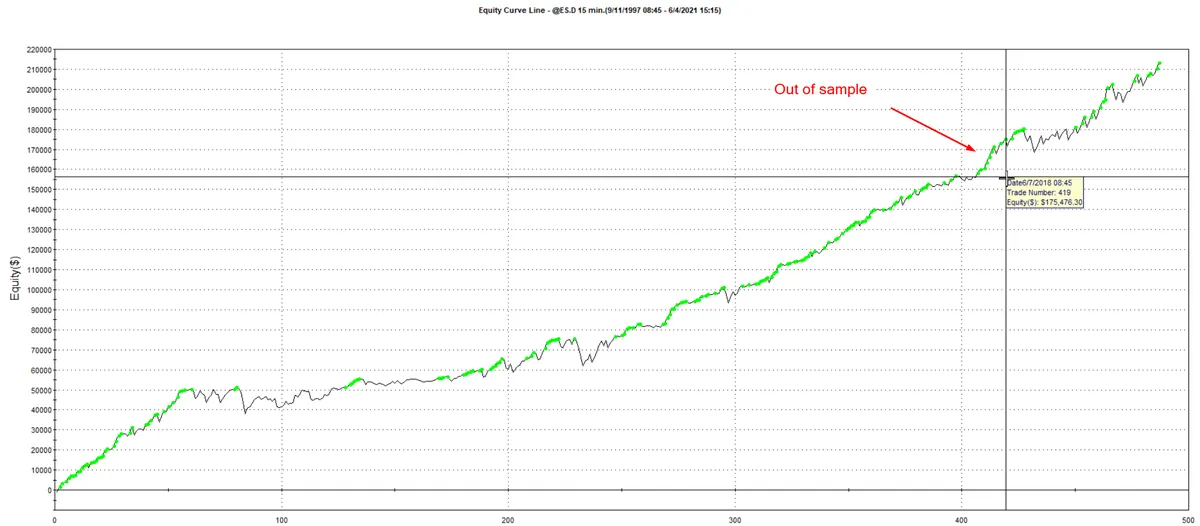
    S&P 500 swing system equity curve with the out-of-sample section after June 2018 marked
    Crude oil 15-minute system

    From Trademaid's 2024 crude oil day-of-week method. Jan 2007 to May 2024, by trade number. The red line is the date the system was built (2022); only about 45 trades come after it.
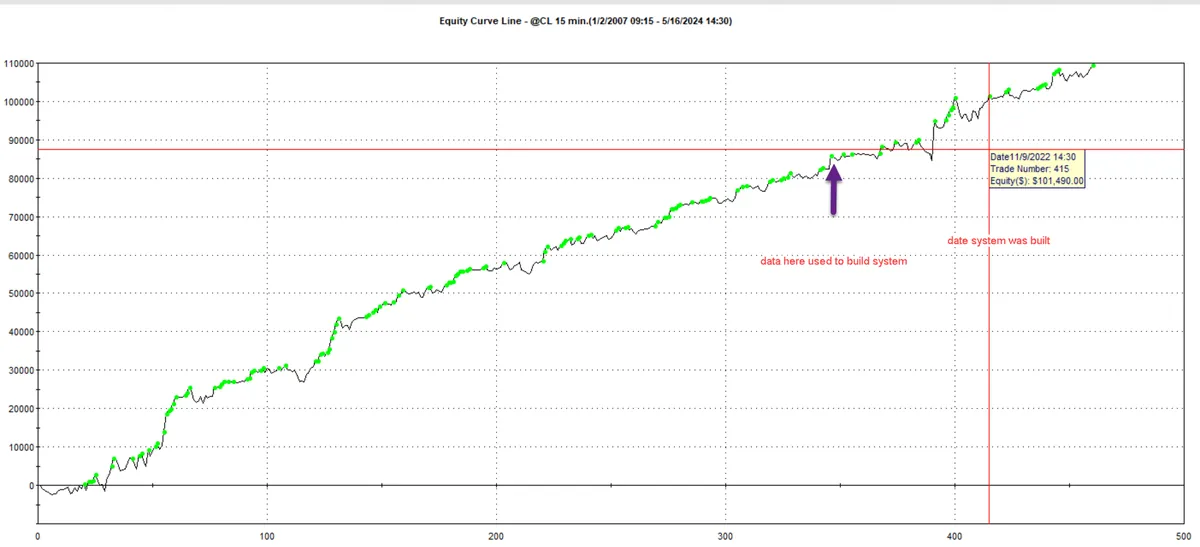
    Crude oil 15-minute system equity curve by trade number with the build date marked
    Verification on other markets

    A 2021 S&P 500 swing system (built on ES 30-min data from 1997 to Feb 2021) run unchanged on EMD, DAX, RTY, NQ and YM over the same dates, so this is not later data. Results vary a lot by market: EMD and YM held up, DAX and NQ did poorly.
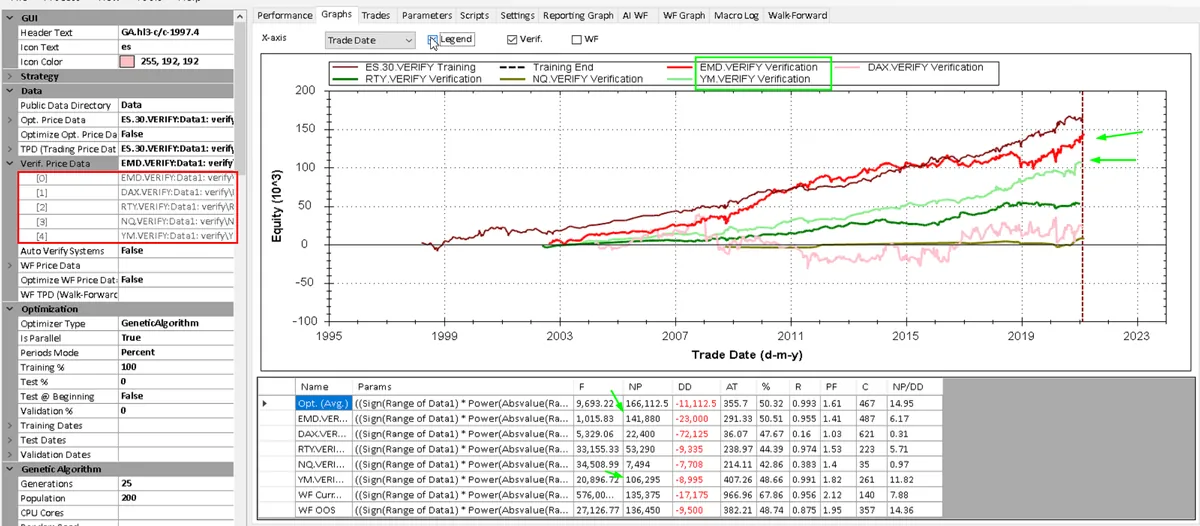
    GSB verification graph of an ES system on EMD, DAX, RTY, NQ and YM data
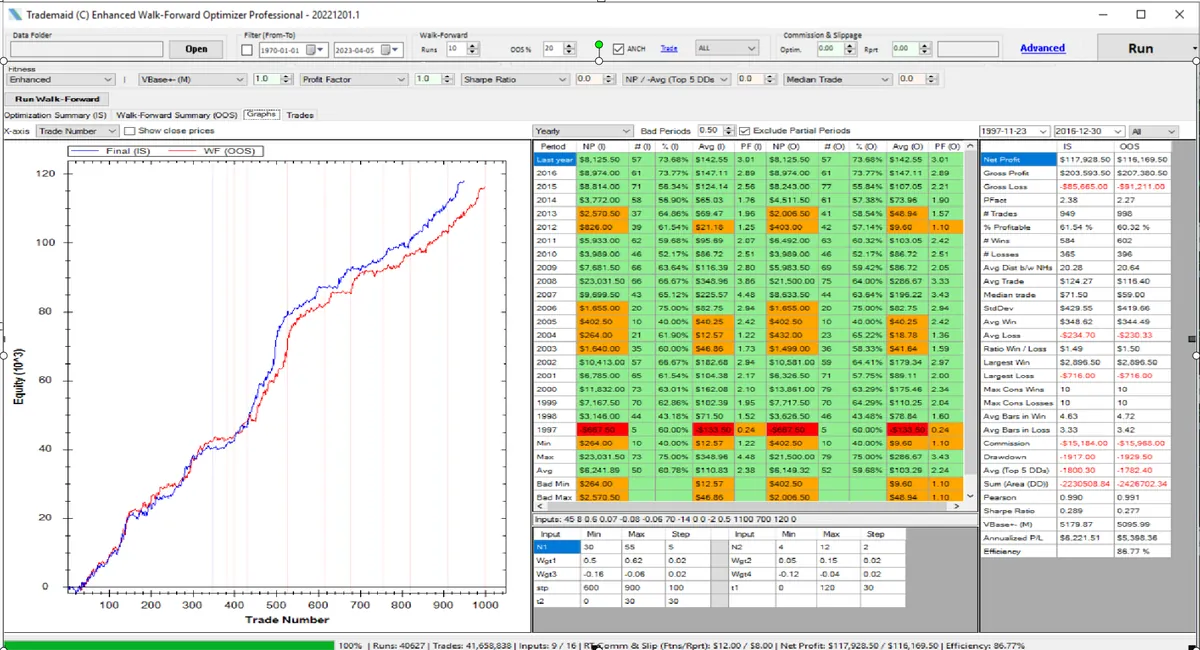
    Rolling walk-forward in Enhanced Walk-Forward Optimizer

    The same 2021 S&P 500 swing system: 10 rolling runs, 20% out of sample, Nov 1997 to Mar 2021, no commission or slippage. Red is the joined out-of-sample result, blue the in-sample.
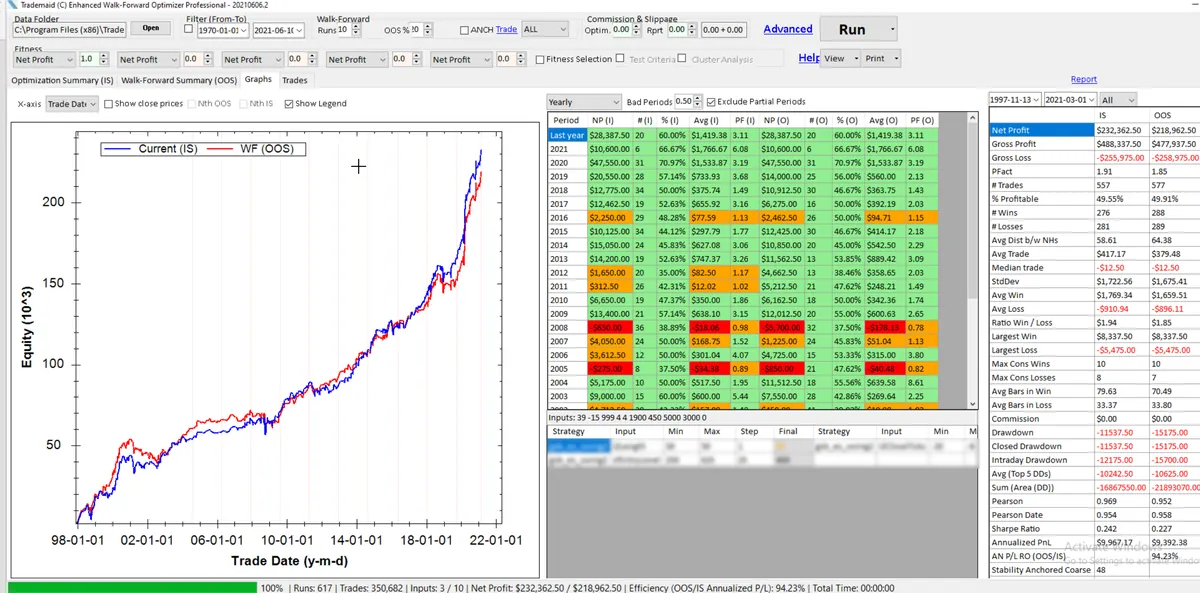
    Enhanced Walk-Forward Optimizer rolling walk-forward, in-sample versus out-of-sample equity curves

    These are hypothetical back-test results shown to illustrate GSB's output, not a promise of future performance. Always verify results on your own platform and paper trade before trading live.

    Get GSB in three steps

    GSB Pro is an authorised GSB reseller. You'll have two logins: your GSB Pro account for the training, and your Trademaid forum login for the download. Licences and payment are handled on Trademaid.

    1

    Your GSB Pro account

    Click Start Free Trial and create a free gsbpro.com account (1 minute). It opens your members area with the training lessons.

    2

    Your trial from Trademaid

    Register on the forum of Trademaid, the official home of GSB: you choose a forum username, and Trademaid emails your password and the download link. Then install GSB on Windows.

    3

    Learn

    Follow the 14-day trial plan in your members area: step-by-step video lessons from install to a tested system.

    The trial lasts 14 days on up to 2 machines. The trial includes a smaller set of indicators than the full version, and GSB Automation needs a GSB licence.

    What you get with GSB

    You buy and license GSB direct from Trademaid, GSB's developer. The guides and training on GSB Pro are free.

    Bought Direct from Trademaid

    Licences are issued by Trademaid, GSB's developer. Buyers in the last 12 months (or with maintenance) get the latest builds through GSB Resource Manager.

    Free 14-Day Trial

    Try GSB free for 14 days (up to 2 machines per person) before you decide to buy.

    Build, Test, Export

    Genetic-algorithm system building, walk-forward testing and code export for TradeStation, MultiCharts and NinjaTrader 8.

    Everything You Need

    Start with the free 14-day trial and the step-by-step plan in your members area. Buy a licence only if GSB suits your market.

    GSB licence issued by Trademaid
    Latest builds via GSB Resource Manager
    Resource Manager free for buyers in the last 12 months or with maintenance
    Trademaid forum access and support
    Free guides and training on GSB Pro
    Optional add-ons: Automation, EWFO, PA Pro

    Advanced Tools for Power Users

    Take your trading system development to the next level with specialized tools designed for professional algorithmic traders
    GSB Automation
    GSB Automation
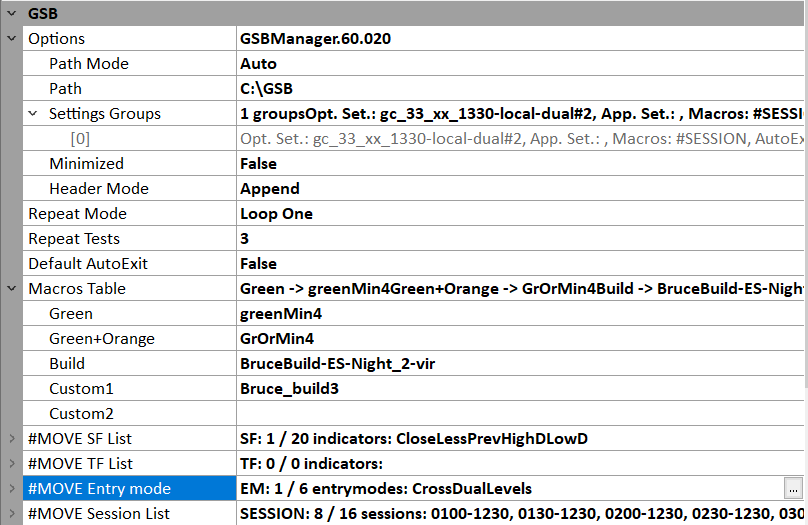
    Drives GSB through macros to run the 2-pass indicator method and batches of comparison tests automatically.
    • •Tests session times, filters and entry types
    • •Statistics output to CSV
    • •Excel summary spreadsheet
    Portfolio Analyst Pro
    Portfolio Analyst Pro
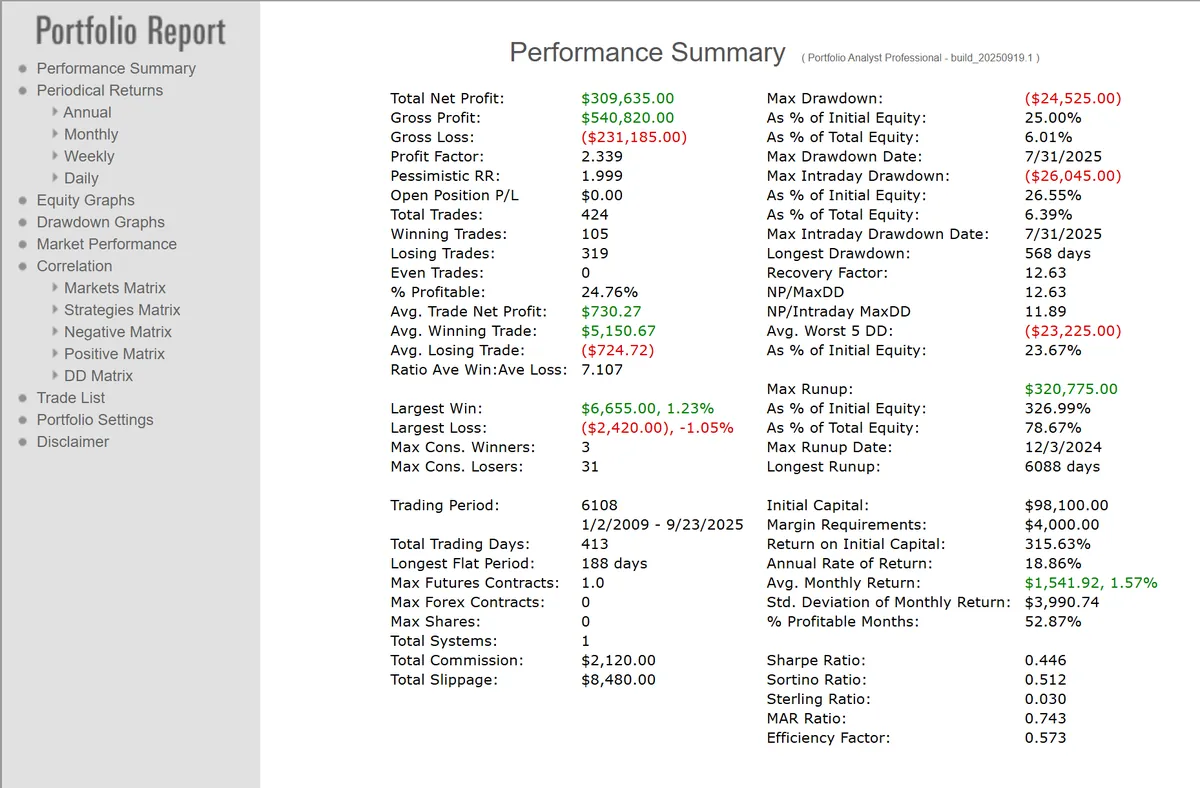
    Combines TradeStation and MultiCharts reports and works out the best combination of systems for net profit to drawdown.
    • •System combination analysis
    • •TradeStation & MultiCharts
    • •Correlation and Monte Carlo
    Enhanced Walk Forward Optimizer
    Enhanced Walk Forward Optimizer
    Walk-forward for TradeStation and MultiCharts optimisations; Trademaid says it is about 4 times faster than TradeStation WFO.
    • •Files over 3 GB (limited by RAM)
    • •Many fitness types
    • •Nth best and cluster analysis
    GSB Resource Manager
    GSB Resource Manager
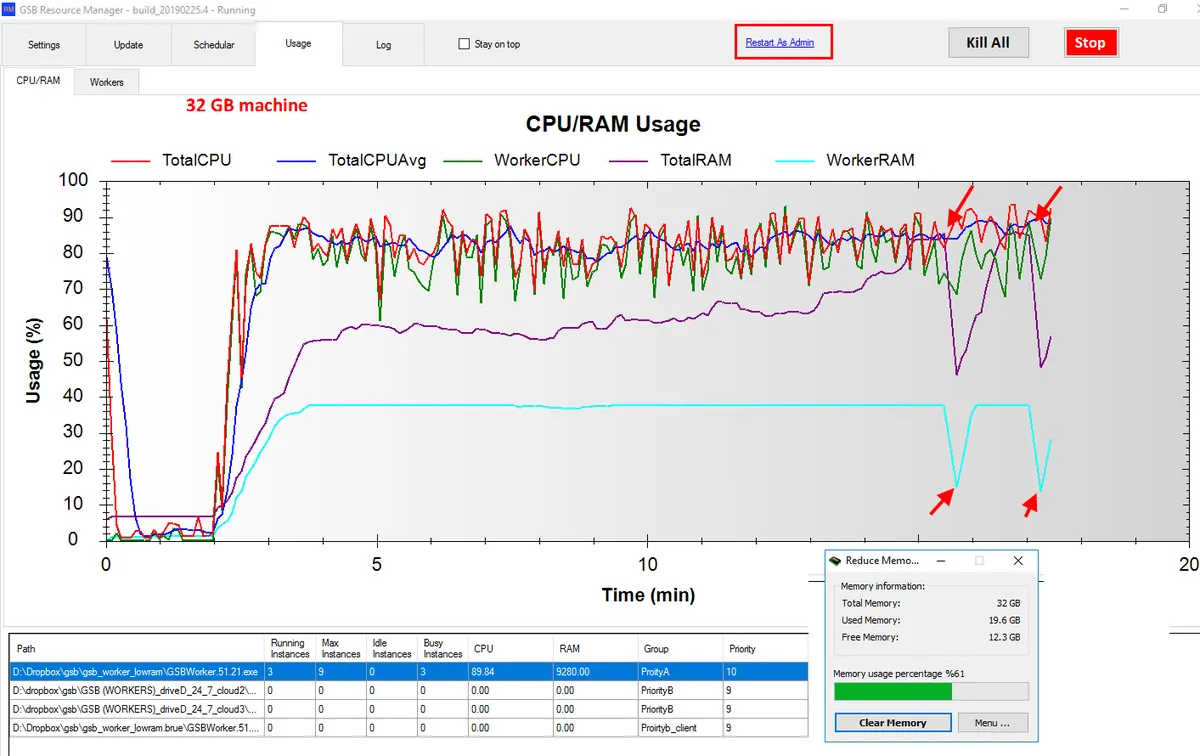
    Runs as many GSB workers as your CPU and RAM allow, and keeps GSB updated.
    • •Automatic software updates
    • •Optional cloud sharing
    • •Free if GSB bought in the last year or maintenance paid

    Frequently asked questions

    Common questions about GSB, sign-up, pricing and usage.

    Click any "Start Free Trial" button on this site and create your free GSB Pro account (about 1 minute). It logs you straight in to the Members Area and its training. Then we send you on to Trademaid, the official home of GSB, run by its developer Peter Zwag, to register on its forum: you choose a forum username, and Trademaid emails your password and the 14-day trial download link. That means two logins: one for gsbpro.com and one for the Trademaid forum.

    GSB Pro is an authorised GSB reseller. Trademaid issues every GSB trial and licence, so you get the official installer, your licence and forum support straight from GSB's developer. Your GSB Pro account is for the training; your Trademaid forum login is for downloads, licences and the forum.

    Licences and add-on tools are bought direct from Trademaid, GSB's developer; GSB Pro takes no payments. A GSB licence is US$1,500; the Pricing page also lists the add-on prices from Trademaid's help pages. Final pricing is confirmed at checkout on Trademaid.

    GSB generates system code for TradeStation and MultiCharts (EasyLanguage, using GSB's functions, which you import from File > Supplementary Scripts) and for NinjaTrader 8 (NinjaScript). Copy the code from the Scripts tab, then check the platform's results match GSB before trading.

    You can hold back out-of-sample dates, walk-forward test systems, and add verification price data (other markets, or your market with random noise added) so you can see whether a system still works on data it wasn't built on. Systems that hold up only on the build data are likely curve-fit.

    GSB is a development and validation tool. After generating and validating strategies, you export clean code to your trading platform for paper trading verification, then live deployment. Always verify exported code matches backtest results.

    The GSB Pro Members Area holds training videos and tutorials for GSB users. Your GSB licence itself, downloads and updates come from Trademaid.

    No programming required. GSB uses genetic algorithms to generate strategies automatically. However, understanding basic trading concepts and validation principles will help you use the tool effectively.