
NinjaTrader Strategy Builder vs GSB, a NinjaTrader 8 Strategy Generator
NinjaTrader's Strategy Builder turns rules you choose into a NinjaScript strategy, while Genetic System Builder (GSB) is a NinjaTrader 8 strategy generator that searches your data for the rules. GSB then writes NinjaScript you compile, reconcile and simulate in NinjaTrader 8.
By GSB Pro · Updated
On this page
NinjaTrader's Strategy Builder and GSB do different jobs
NinjaTrader 8 includes a Strategy Builder, opened from the Control Center's New menu. Its help describes it as a way to generate NinjaScript-based strategies for automated trading, using a Condition Builder and Strategy Actions. You decide the conditions and actions; NinjaTrader writes the code.
GSB starts from the other end. You supply the market, data and build settings, and its genetic algorithm searches for the rules. It builds and tests large numbers of candidate systems from its built-in indicators, then keeps those that hold up on data held back from the build.
| NinjaTrader Strategy Builder | GSB (strategy generator) | |
|---|---|---|
| Who finds the rules | You | GSB's genetic search |
| Starting point | An idea you already have | Your market, data and settings |
| Output | A NinjaScript strategy | NinjaScript, plus TradeStation and MultiCharts versions |
| Validation | NinjaTrader's backtesting tools | Out-of-sample dates, walk-forward and verification data in GSB |
| Suits | Automating a defined idea | Searching for systems you hadn't thought of |
Neither replaces the other. If you have a clear rule set, NinjaTrader's builder is the direct route. If you want the software to search for rules and test them out of sample, that's the job GSB does.
How GSB exports a system to NinjaTrader 8
Every step, with screenshots, is in the Strategy Guide's Export to NinjaTrader page. In short:
- Build and select. Run a build, choose a system and walk it forward. See Selecting Systems and Walk-Forward Optimization.
- One-time setup. Import the GSB AddOn (Tools → Import → NinjaScript Add On) and compile LibGSB. Set the time zone to Central Time (US & Canada), the global merge policy to Merge back adjusted, and add a Trading Hours template matching your GSB session.
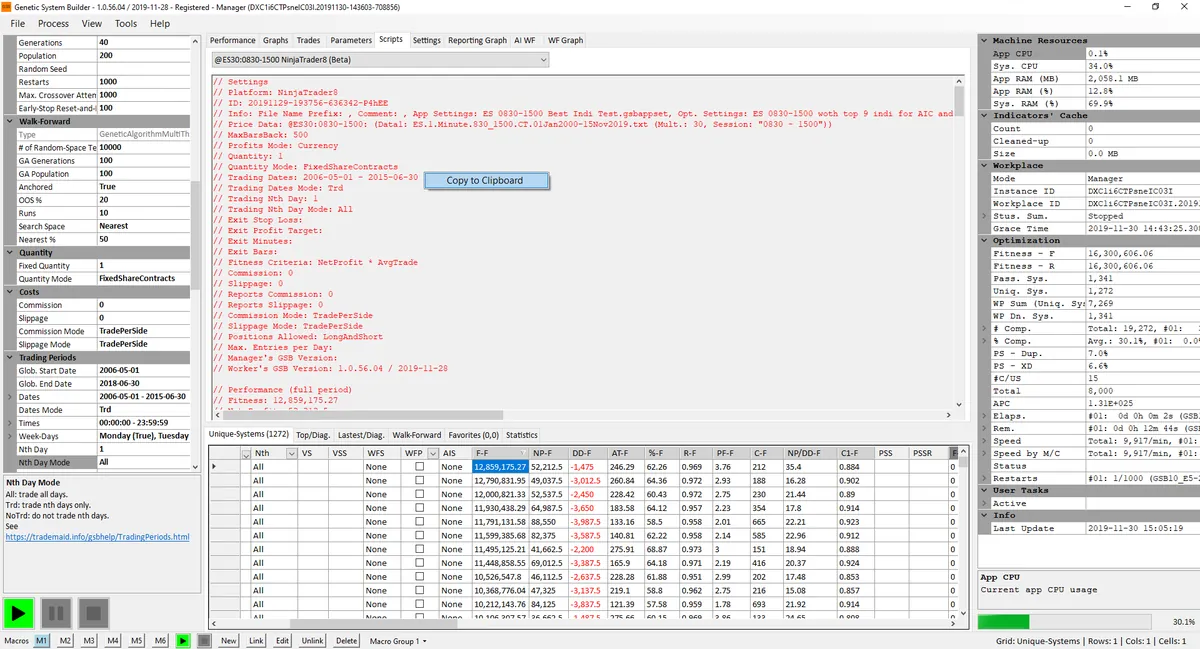
- Copy the script. On GSB's Scripts tab choose the line ending in NinjaTrader8, or NinjaTrader8 / WF after a walk-forward. Copy the system ID from the header.
- Create the strategy. In the NinjaScript Editor click +, then Next. Name it GSB plus the ID, so it starts with a letter, and click Generate.
- Paste and compile. Delete the template code, paste GSB's code and click Compile.
- Match the chart. In Data Series, set the same instrument, bar type and value, Custom range dates and Trading hours as your GSB build.
- Add the strategy. Use Sim101, tick Enabled, keep Standard fills, enter GSB's slippage, and tick Exit on session close if you built with MOC exits.
Hypothetical Performance Disclosure
NinjaTrader support in GSB today
- New GSB features reach TradeStation and MultiCharts first. NinjaTrader support follows later.
- Since build 68.12, indicators that don't match in NinjaTrader are turned off for NinjaTrader builds.
- From 2026, GSB writes full NinjaScript for all stop types, profit targets, secondary filters and entry modes, and 17 filters are NinjaTrader-ready.
- The settings editors only list items that work on your chosen platform.
Peter Zwag, GSB's developer, suggests that if you already know TradeStation, use it, because it gets features first. If NinjaTrader is your platform, GSB still supports it. See GSB with TradeStation to compare.
Data setup: build on NinjaTrader data
Build on data exported from NinjaTrader, because prices differ between platforms even for the same market and bar size. NinjaTrader exports through the GSB Price Data Exporter indicator, which comes with the GSB AddOn.
- Open a chart with Custom range dates and your Trading Hours template, then scroll left to see where the data really starts.
- Add the GSB Price Data Exporter indicator without changing its settings, and save the file to GSB's Price Data folder.
- Name the file GSB's way, for example ES.30.Minute.0830-1500CentralTime_1May2006-29Nov2019.txt.
Volume-based indicators
The common NinjaTrader data feeds don't carry historical up and down volume. Systems that lean on volume indicators, such as accumulation/distribution, can lose a little in NinjaTrader. Build on the data feed you'll trade.
Full steps are on Uploading Data to GSB.
Reconciling and live trading on NinjaTrader
Right-click the chart and open Strategy Performance, then Historical. Over the same dates, compare net profit, drawdown and number of trades with GSB.
- Simulate first. Leave the strategy on Sim101 for at least two weeks, with Global Simulation Mode on.
- Going live. Set Account to your live account, keep Enabled ticked, and turn Global Simulation Mode off. While it's ticked, nothing reaches your broker.
- (D) before the name means the strategy is disabled and won't trade.
- Daily check. The Control Center's Strategies tab shows each strategy's account, connection and enabled state. Glance at the Log tab for errors.
- Start small. Peter's observation is that traders who over-leverage do not survive.
Holidays, rollovers and other operational issues are covered in Live Trading Operations.
Honest limits
- NinjaTrader gets new GSB features later than TradeStation and MultiCharts.
- GSB runs on Windows only, and searches its own built-in indicators rather than testing your ideas.
- The learning curve is steeper than a point-and-click builder. The free 53-lesson course covers each stage.
- The free 14-day trial has a smaller indicator set than the full version.
- A reconciled backtest is still hypothetical. Systems can and do fail out of sample.
To compare GSB with other generators, see our comparison page. GSB Pro is an authorised reseller, so it has an interest in the sale.
Frequently asked questions
What is the difference between NinjaTrader's Strategy Builder and a strategy generator?
In NinjaTrader's Strategy Builder you set the conditions and actions, and it writes the NinjaScript. A generator such as GSB searches for the rules itself, tests them out of sample, and then writes the code.
Does GSB export to NinjaTrader 8?
Yes. GSB's Scripts tab has a NinjaTrader8 version of each system, plus NinjaTrader8 / WF after a walk-forward. You paste it into a new strategy in the NinjaScript Editor and compile it.
Why won't my GSB strategy compile in NinjaTrader?
Usually the GSB AddOn (LibGSB) isn't imported and compiled, or it's older than the code. Also check the strategy name starts with a letter and that you deleted all the template code.
Why don't my NinjaTrader results match GSB?
Check the Data Series dates and Trading hours, the Central Time setting, Merge back adjusted, slippage, commission and Exit on session close. Volume-based indicators can also differ because of the data feed.
Can I build a NinjaTrader strategy without coding?
Yes, either way. NinjaTrader's Strategy Builder writes code from rules you choose, and GSB writes NinjaScript from rules it finds.
Are automatically generated strategies data-mined or curve-fit?
They can be, so GSB uses out-of-sample dates, walk-forward testing and verification data. You still reconcile in NinjaTrader and simulate before trading real money.
Try it on your own market
Start a free 14-day GSB trial and learn the method with our free 53-lesson video course. GSB Pro is an authorised Trademaid reseller and earns a commission if you buy.