
Walk-Forward Analysis: How It Works and How to Read It
Walk-forward analysis optimises a trading system on one stretch of past data, then tests those settings unchanged on the data that follows. It then steps forward and repeats. Joined together, the test periods show how the system behaved on data its settings were never fitted to.
By GSB Pro · Updated
On this page
- What is walk-forward analysis?
- In-sample and out-of-sample windows
- Anchored vs rolling walk-forward
- Walk-forward efficiency and how to read it
- How many walk-forward windows do you need?
- Common walk-forward mistakes
- How GSB does walk-forward analysis
- Going further: the Enhanced Walk-Forward Optimizer
- After the walk-forward
What is walk-forward analysis?
Any optimiser that tests enough settings will find some that look good on past data by luck. That is curve fitting, and a curve-fit system tends to fall apart on new data. The only fair test is data the optimiser never saw.
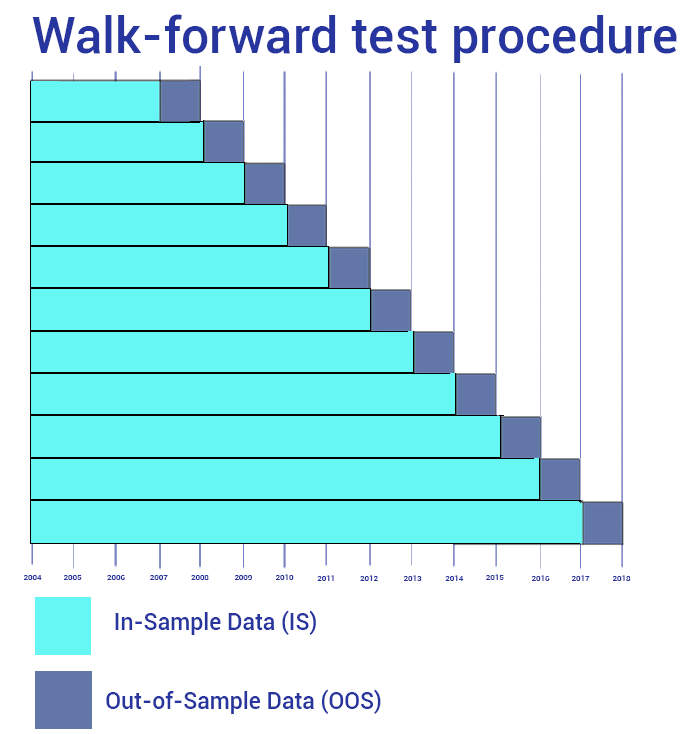
Walk-forward analysis builds that test into the process. It does three things, over and over:
- Optimise the system's parameters on a past segment of data (the in-sample window).
- Test those parameters, unchanged, on the segment straight after it (the out-of-sample window).
- Step forward and repeat until you reach the end of the data.
Put end to end, the out-of-sample pieces cover a long stretch of history. Every piece was traded with settings chosen before that period began. That joined-up result is the heart of the analysis.
The terms vary. Walk-forward optimisation (often spelt optimization) usually means the procedure; walk-forward analysis means the procedure plus reading the result. This guide treats them as one topic.
In-sample and out-of-sample windows
Two settings shape every walk-forward. The number of runs decides how many times the optimise-then-test cycle happens. The out-of-sample percentage decides how much of each segment is held back for testing.
Why not just hold back one block at the end? Do that too. But one split gives one result from one market period, and it might be lucky or unlucky. A walk-forward tests many periods, and it mirrors how many traders re-optimise a live system from time to time.
Be realistic about what it proves. Walk-forward reduces the risk of trading an over-fitted system. It doesn't remove it, so treat it as one layer of checking among several.
Anchored vs rolling walk-forward
There are two ways to move the in-sample window forward:
| Anchored | Rolling | |
|---|---|---|
| In-sample window | Always starts at the first bar and grows each run | Fixed length that slides forward each run |
| Old data | Kept for every optimisation | Dropped as the window moves |
| Suits | Systems that need lots of history or trades | Testing whether recent data alone is enough |
| Risk | Slow to adapt if the market changes character | Fewer trades per window, so noisier settings |
Neither is right for every system. A rolling walk-forward is the harsher test, because each optimisation sees less data. An anchored one gives each optimisation the most trades, which usually means steadier parameters.
In GSB, Anchored is on by default, and Trademaid's guidance favours it. GSB systems consistently do better anchored. Trademaid treats rolling as a harder stress test that suits systems with few trades poorly. Peter Zwag (GSB's developer) doesn't use its final parameters.
Walk-forward efficiency and how to read it
Walk-forward efficiency (WFE) compares the out-of-sample result with the in-sample result. Trademaid's help defines it as:
Walk-forward efficiency
WFE = (out-of-sample annualised return ÷ in-sample annualised return) × 100
At 100%, the test periods earned at the same yearly rate as the optimised periods. Out-of-sample results are usually lower, because the optimiser picked the in-sample settings with hindsight. A low WFE suggests much of the in-sample result was fitted to noise.
Trademaid's rough guideline is WFE above 60%. Over 100% can happen. It's fine, but it isn't automatically better, so still check the equity curves and the trade figures.
Don't lean on WFE alone. Peter Zwag puts far more weight on parameter stability: in his tests, out-of-sample results rose in line with walk-forward stability. He has called WFE "almost useless", because it ignores how good the market was in each period.
A worked example shows why context matters. In Trademaid's S&P 500 swing case study, an anchored walk-forward in the Enhanced Walk-Forward Optimizer showed 89.07% efficiency, and a rolling one 94.23%. Yet the final walk-forward had only 140 trades, and Trademaid wrote that normally it would discard the system for that reason.
Hypothetical Performance Disclosure
How many walk-forward windows do you need?
There is a trade-off. More runs means more separate tests and more re-optimisations. But each out-of-sample window gets smaller, and a window with only a handful of trades says little.
GSB's defaults are 10 runs with 20% out-of-sample. Trademaid says both are best left on the default, and Peter Zwag never uses anything but 10 runs. Trademaid's own Enhanced Walk-Forward Optimizer examples use the same 10 runs and 20%.
A single choice of runs and out-of-sample percentage can itself be lucky. That is what a cluster analysis checks. It runs a whole grid of walk-forwards with different settings and grades each one, as covered below.
Watch the trade count too. The Enhanced Walk-Forward Optimizer's cluster settings favour runs with 30 or more trades. Trademaid notes that grid cells with a small out-of-sample percentage and few runs are prone to fail, because each out-of-sample area is too small.
Common walk-forward mistakes
- Tuning until the out-of-sample curve looks good. Every change made after seeing the result quietly turns out-of-sample data into in-sample data. Keep notes on what you tried and why.
- Leaving out costs. Without realistic slippage and commission, an optimiser drifts towards thousands of tiny trades. Trademaid's example: $100,000 from 10,000 trades averaging $10 isn't tradable.
- Too few optimisation passes. With a genetic optimiser, too few generations make identical walk-forwards disagree. Run the same walk-forward twice; if the results differ much, add iterations.
- Ranges that are too narrow. A parameter that ends the walk-forward at the edge of its range is a critical problem, because the best value may lie outside it. At the start, it's minor.
- Fixing parameters to look stable. Not walking an input forward inflates the stability score. Only do it for a good reason.
- Ignoring the trade count. Be wary if the number of trades doubles or triples out-of-sample, or if a window has too few trades to mean anything.
- Walking forward everything. Peter's view is that walking forward hundreds of systems by macro is not part of the method. Walk forward a few members of each family of similar systems.
- Reading one number. A good WFE with erratic parameters, or a smooth curve with a weak average trade, is not a pass.
How GSB does walk-forward analysis
Genetic System Builder (GSB) has walk-forward built in. You right-click a system and choose Run Walk-Forward, then Genetic Algorithm. The full click-by-click steps are in the Strategy Guide's Walk-Forward Optimization page.
The settings Trademaid uses for a first walk-forward: GA Generations 120, GA Population 120 and Nearest % 60, with everything else on its default. Use 150 x 150 for systems with four or five indicators, and treat 100 x 100 as the floor.
GSB draws the joined-up out-of-sample result as WF OOS. Trademaid expects real-time trading to look more like WF OOS than like the original backtest. Check the result in this order:
- The WF OOS curve sits at or above the original, rises fairly straight and runs roughly parallel to it. Curves drifting further apart over time: reject.
- Profit factor out-of-sample is as good as or better than the original.
- Average trade is as good or better, and covers brokerage plus slippage.
- Net profit and trades: a small drop in net profit is acceptable; trades doubling or tripling is not.
Then GSB's scores. Trademaid's thresholds, which it calls guidelines rather than guarantees:
| Score | GSB column | Trademaid's guideline |
|---|---|---|
| Anchored parameter stability | PAS (PAS-C in newer builds) | Above 40 |
| Rolling parameter stability | PRS (PRS-C in newer builds) | 62 or more |
| Walk-forward efficiency | WFE | Above 60% |
| Parameters | Walk-Forward tab | Steady in roughly the last quarter of runs |
Trademaid hasn't confirmed whether the 40 and 62 thresholds apply to the coarse versions of the scores. The Walk-Forward Optimization page explains what each score measures.
Going further: the Enhanced Walk-Forward Optimizer
Trademaid's Enhanced Walk-Forward Optimizer (EWFO) is a separate product. It reads optimisation files from TradeStation, MultiCharts or GSB. For a standard GSB system you don't need it, but you do once you've added code GSB can't walk forward.
EWFO's Test Criteria grade each walk-forward. Trademaid's suggested values, which it calls only a rough guide:
- Walk-forward efficiency above 60
- At least 8 out of 10 runs profitable
- No single run more than 50% of total profit
- No run's drawdown more than 25% of initial capital
A cluster analysis then runs a grid of walk-forwards with different out-of-sample percentages and numbers of runs. Trademaid looks for a block of passing cells around the centre, and at least 7 or 8 passing cells. It also warns these goals may be unrealistically high.
When comparing fitness types, EWFO reports an IS/OOS ratio; Trademaid's help says 0.7 to 1.3 is OK. Trademaid's screenshot of the Test Criteria dialog shows different pre-filled values (for example 50% rather than 60%), so check the dialog in your build.
After the walk-forward
A system that passes has earned a closer look, not a guarantee. Next come verification on other bar intervals and a Monte Carlo walk-forward, described in Validation and Robustness and the Robustness Lab.
Want to learn it hands-on? The free GSB Pro course walks through a first walk-forward, and the free trial lets you run one on your own data.
Frequently asked questions
What is walk-forward analysis?
Walk-forward analysis optimises a trading system on one period of past data, tests those settings unchanged on the next period, then steps forward and repeats. The joined-up test periods show how the system did on data its settings were never fitted to.
What is a good walk-forward efficiency?
Trademaid's rough guideline is a walk-forward efficiency above 60%. Treat it as one check among several, because efficiency ignores how tradable each period was; Trademaid puts more weight on parameter stability.
Is anchored or rolling walk-forward better?
Neither suits every system. Anchored gives each optimisation the most data and usually steadier parameters, while rolling is a harsher test. Trademaid's guidance for GSB favours anchored, and GSB systems consistently do better anchored.
How many walk-forward runs do I need?
GSB's defaults are 10 runs with 20% out-of-sample, and Trademaid recommends leaving them there. Make sure each out-of-sample window still holds enough trades, and use a cluster analysis to check the result doesn't depend on one lucky choice.
Does walk-forward analysis prevent overfitting?
It reduces the risk but doesn't remove it. If you keep changing settings after seeing the out-of-sample result, that data becomes in-sample, so pair walk-forward with other robustness checks and realistic costs.
Is walk-forward optimisation the same as walk-forward analysis?
They are used almost interchangeably. Walk-forward optimisation usually names the repeated optimise-and-test procedure, and walk-forward analysis includes reading the result.
Try it on your own market
Start a free 14-day GSB trial and learn the method with our free 53-lesson video course. GSB Pro is an authorised Trademaid reseller and earns a commission if you buy.