
Building Trading Strategies
Discover robust trading systems automatically using genetic algorithms and walk-forward optimization
GSB Pro doesn't require you to manually select indicators or parameters. The software automatically:
- Tests thousands of indicator combinations
- Finds which indicators actually work on your data
- Optimizes parameters using genetic algorithms
- Eliminates human bias from the discovery process
Building a Day Trading System
In this video we cover the basics on using GSB to build a day trading system that you can export to Tradestation, Multicharts and Ninjatrader.
Day Trading System Setup
To build a day trading system in GSB Pro:
- Load intraday data: Use 1-minute, 5-minute, or 15-minute bars depending on your trading style
- Set entry/exit rules: Configure whether to allow same-bar exits, end-of-day exits, or position holding overnight
- Define fitness criteria: Select optimization targets (net profit, Sharpe ratio, profit factor, etc.)
- Start the build process: GSB Pro will automatically discover indicators and build systems
Building a Swing Trading System
Learn how to use GSB to automatically build a swing trading system for Apple Computer using 30 Minute Intraday Data on AAPL and verify the system on Microsoft and Adobe.
Part two in building a swing trading system for Apple Computer. Verify the system on Microsoft and Adobe along with running a walk forward analysis.
Swing Trading System Characteristics
Swing trading systems typically:
- Hold positions for multiple days or weeks
- Use daily or 30-60 minute bars
- Focus on trend-following or mean-reversion
- Require fewer trades than day trading systems
The Build Process
Step 1: Configure Build Settings
Before starting the build, configure your system parameters in the GSB GUI settings:
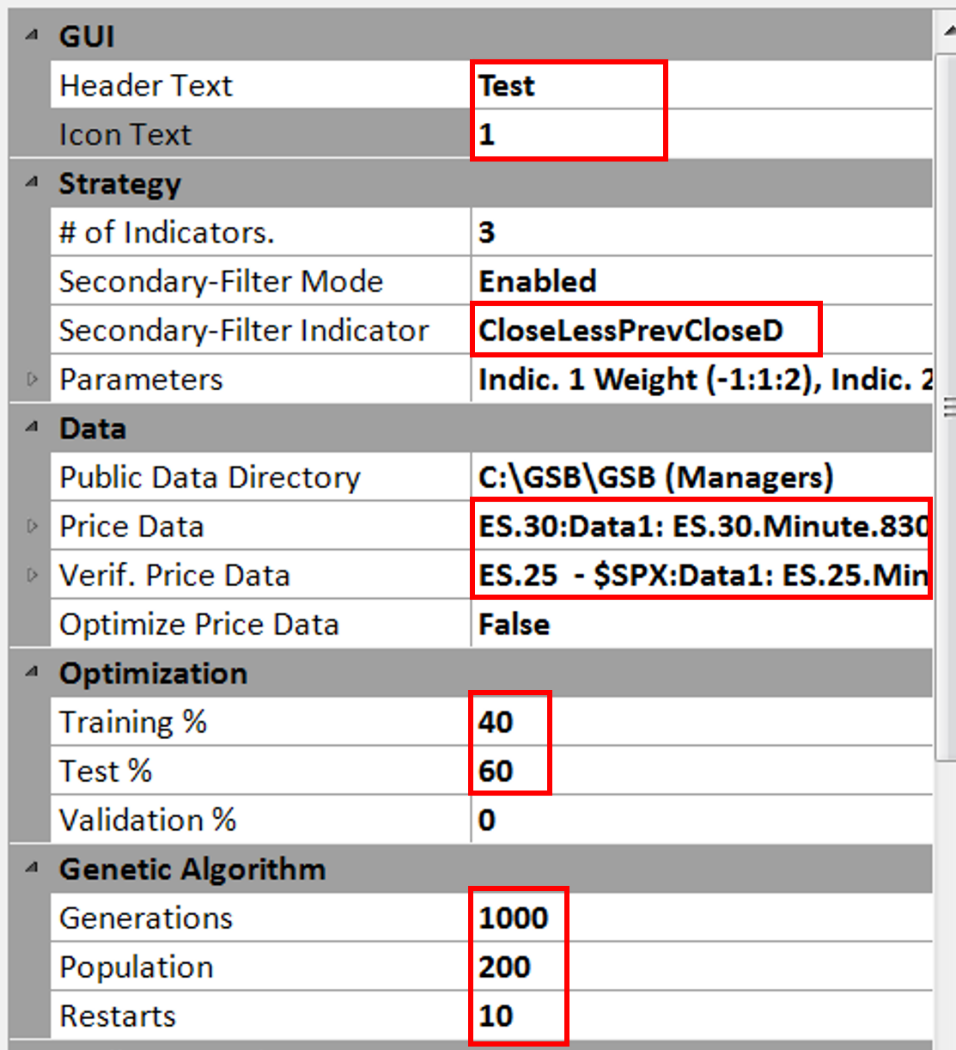
Configure strategy settings, data sources, and genetic algorithm parameters
- Strategy Settings: Number of indicators (3 shown), secondary filter mode, and data paths
- Optimization Split: Training % (40), Test % (60), Validation % (0 or adjust as needed)
- Genetic Algorithm: Generations (1000), Population (200), Restarts (10)
- Data Configuration: Public Data Directory path and Price Data symbols
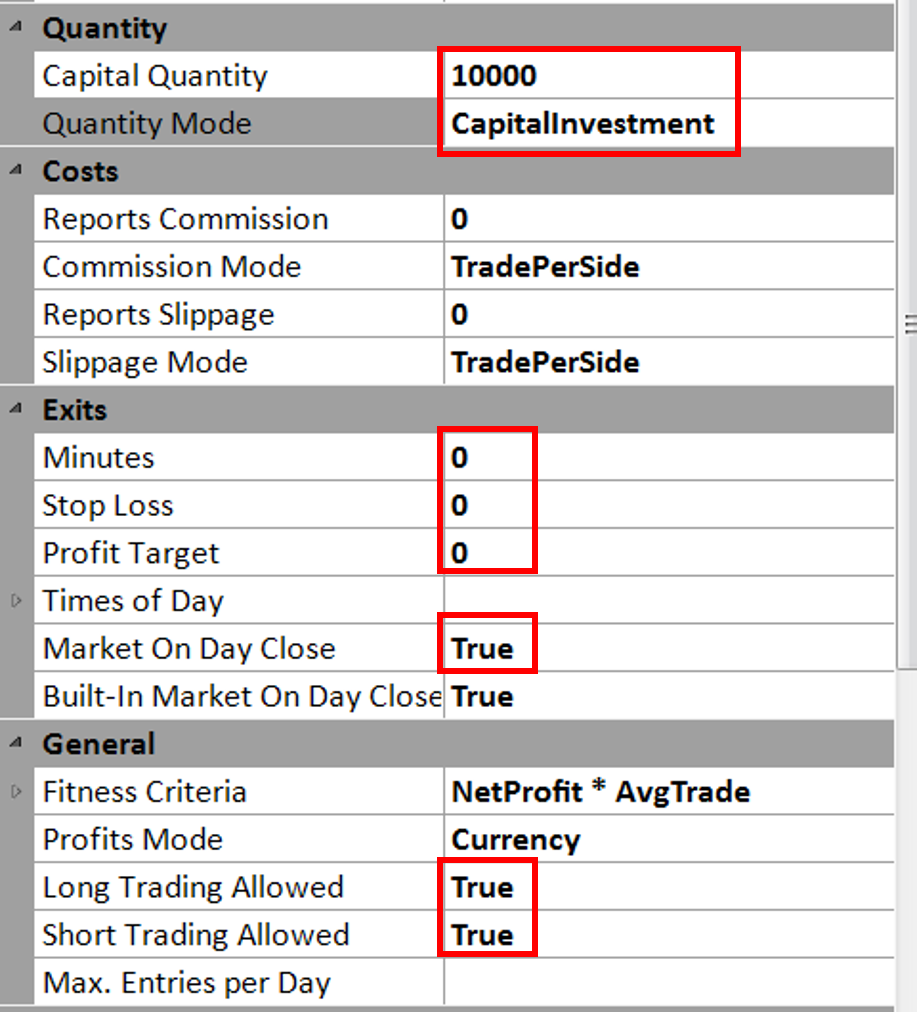
Set capital, costs, exit rules, and general strategy parameters
- Capital Quantity: Starting capital (e.g., 10000) and Quantity Mode (CapitalInvestment)
- Costs: Commission and slippage settings (TradePerSide mode)
- Exits: Time-based exits (Minutes, Stop Loss, Profit Target)
- General: Fitness Criteria (NetProfit * AvgTrade), Long/Short Trading Allowed
Step 2: Define Fitness Function and Performance Filters
The fitness function determines what makes a "good" strategy. You should also configure performance filters to eliminate poorly performing systems:
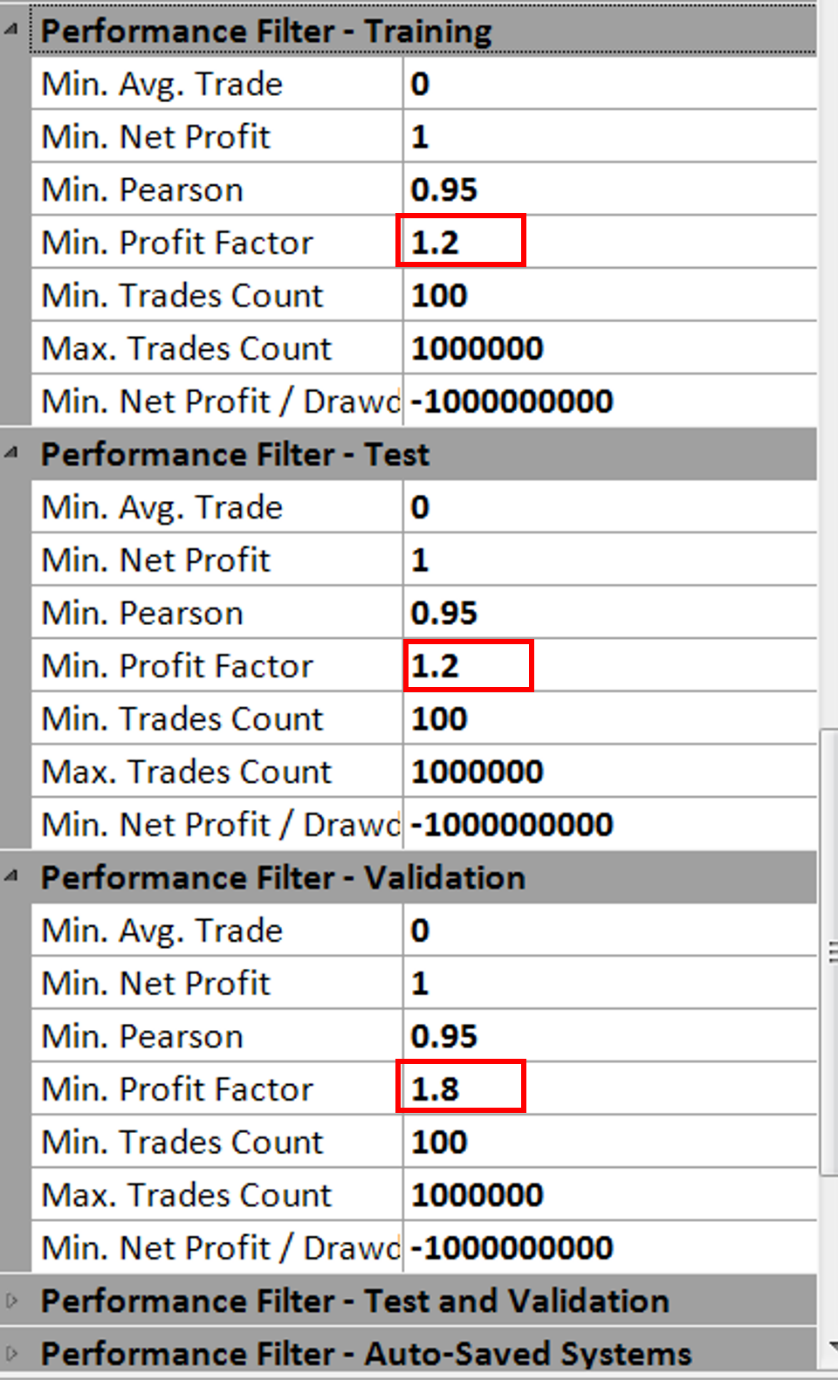
Set minimum performance thresholds for each testing period
- Min. Profit Factor: Training (1.2), Test (1.2), Validation (1.8) - filters out unprofitable systems
- Min. Trades Count: Minimum 100 trades required for statistical significance
- Min. Pearson: Correlation coefficient (0.95) ensuring equity curve consistency
- Min. Net Profit: Minimum profit threshold (1) to eliminate marginally profitable systems
Step 3: Start the Build
Once configured, click the green Play button to start the genetic algorithm build process:

Click the green play button to begin strategy discovery
GSB Pro will:
- Generate an initial random population of strategies
- Test each strategy on your data
- Rank strategies by fitness
- Breed the best strategies to create new variations
- Repeat the process for the specified number of generations
- Present the top-performing systems for evaluation
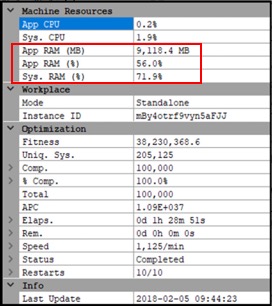
Monitor machine resources and optimization progress during the build
During the build, GSB displays real-time resource usage (CPU, RAM) and optimization status. The process completes when all generations finish or you manually stop it.
Step 4: Review Results
After the build completes, GSB Pro displays:
- List of discovered systems ranked by fitness
- Performance metrics for each system
- Equity curves and trade-by-trade results
- Strategy rules and indicator combinations used
Systems discovered in the build process must be validated to ensure robustness. Do not trade a system based solely on in-sample results. Always proceed to validation and walk-forward testing.
Understanding the Build Results
In-Sample vs Out-of-Sample
GSB Pro automatically divides your data:
- In-Sample: Training data used to discover the system (typically 70%)
- Out-of-Sample: Reserved validation data never seen during discovery (typically 30%)
What Makes a Good System?
Look for systems that show:
- Similar performance in-sample and out-of-sample
- Reasonable number of trades (not too few, not over-fitted)
- Smooth equity curve with controlled drawdowns
- Logical indicator combinations
Strategy Panel: Core workspace for creating trading systems using indicators, price patterns, and entry/exit logic
Building Blocks: Select from 100+ technical indicators and custom functions for your strategy
Entry/Exit Rules: Design long/short entry conditions and configure profit targets, stops, and trailing exits
Optimization Panel: Configure genetic algorithm parameters for evolutionary strategy search
Next Steps
After building trading systems, the critical next step is validation and robustness testing to ensure your systems will perform in live markets.